Assembly Library Branch
Double clicking on an Assembly Library branch in the Project Tree panel will display the Assembly Manager enabling you to add or remove one, or more, assemblies to the setup.
Right-click on an Assembly Library branch in the Project Tree panel to display the following menu:
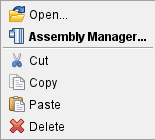
Open — opens a file selection window enabling you to load Assembly Library files.
Assembly Manager... — opens the Assembly Manager enabling you to add or remove one, or more, assemblies to the setup.
Cut — Cuts the highlighted file from the Project Tree and puts it in the paste buffer.
Copy — Copies the highlighted file from the Project Tree to the paste buffer.
Paste — Replaces the highlighted file, with the NC Program file contained in the paste buffer.
Delete — Deletes the highlighted file from the Project Tree.