CNC Machine Branch
Right-click on a CNC Machine branch in the Project Tree panel to display the following menu:
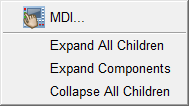
MDI — Opens the MDI window enabling you to manually enter and process blocks of G-Code data.
Expand All Children — Expands all branches of a CNC Machine branch.
Expand Components — Expands all child branches of the selected (highlighted) component.
Collapse All Children — Collapses all branches of a CNC Machine branch.
If the Configure icon is toggled “on”, the Configure CNC Machine menu displays at the bottom of the Project Tree.