PolyFix Converter
Location:
Utilities tab >  (PolyFix)
Introduction to the PolyFix Converter
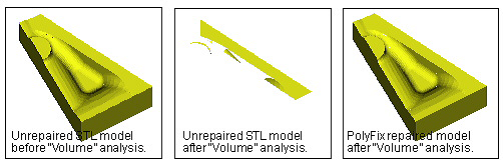
The PolyFix Converter ensures the surface normal vectors of Stereolithography (STL) and Vericut Polygon Model files point uniformly outward from the model surface. Model files with inconsistent normal vectors often appear okay in Vericut - until the solid model database is established, such as occurs when cutting is started or the model analyzed. It is a one time effort to repair an inconsistent polygon model file. After repair, the model data will be processed much faster and more reliably. Model files can be repaired interactively in Vericut, via batch processing, or outside of Vericut by running the "polyfix" command file.
PolyFix Converter window
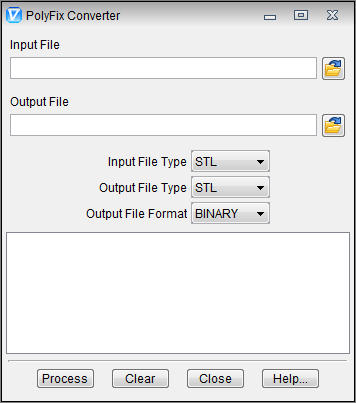
Input File — The name of the file containing the surface normal vectors to repair. Enter the /path/filename in the Input File text field or click on the  (Browse) icon to display the Select Input File file selection window and use it to specify the /path/filename.
Output File — The name of the file to receive repaired geometry data. Enter the /path/filename in the Output File text field or click on the (Browse) icon to display the Select Output File file selection window and use it to specify the /path/filename.
When a model file containing multiple solids is processed, multiple output files are created-one per solid. Each file output has the base file name specified by the Output File field, with a unique number appended to it incremented by 1.
Input File Type — The type of input file to be read. Options are: Vericut or STL.
Output File Type — Same as Input File Type, except is applicable to the output file.
Output File Format — The format of the output file. Options are: BINARY or ASCII.
Process — Processes (repairs) the model file data according to the current window settings. Repaired geometry is written to the Output File. Error and informational messages from the process are sent to the PolyFix Converter window message area, and to a log file named "polyfix.log" created in the working directory.
Clear — Clears the PolyFix Converter window message area.
Close — Closes the PolyFix Converter window.
Help — Displays this Help page. (You can also use the F1 key to display this Help page.)