Block Renumber window
The Block Renumber window is accessed from the NC Program panel by selecting Block Renumber, in the Utilities menu.
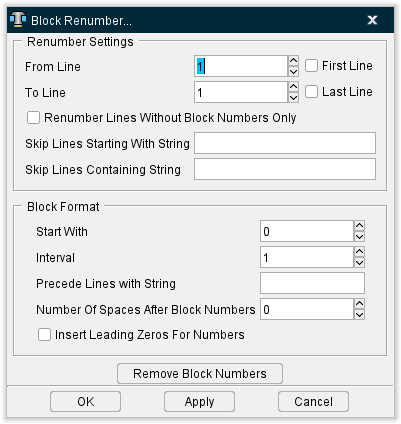
Renumber Settings
Use the Renumber Settings options to specify where to start, and stop, renumbering.
From Line — Use this feature to specify the line in the NC program to begin the renumbering.
First Line — When toggled "On" renumbering will begin at the first line in the NC program.
To Line — Use this feature to specify the line in the NC program to stop the renumbering.
Last Line — When toggled "On" renumbering will stop at the last line in the NC program.
Renumber Lines Without Block Numbers Only — When toggled "On", only blocks within the specified range that do not currently have block numbers will be renumbered.
Skip Lines Starting with String — Enables you to specify a string of characters, that when found at the start of the block, will cause Vericut to skip the block during the renumbering process.
Skip Line Containing String — Enables you to specify a string of characters, that when found anywhere within the block, will cause Vericut to skip the block during the renumbering process.
Block Format
Use the Block Format options to specify the format, and number sequence, to use for block numbers. The formats specified must conform to the characteristics defined in the current control file.
Start With — Use this feature to specify the starting number to use for the renumbering sequence.
Interval — Use this feature to specify the increment between numbers to be used for the renumbering sequence.
Precede Lines With String — Use this feature to specify a character, or string of characters, to be used before the block number.
Number Of Spaces After Block Numbers — Use to specify the number of blank spaces to be used between the block number and the next item in the block.
Insert Leading Zeros For Numbers — When toggled "On" leading zeros will be used in the block number.
Remove Block Numbers — Removes all block numbers from the NC program file. Block numbers are identified by the characteristics defined in the current control file.
OK — Applies the new block numbers, as specified, to the NC program file and closes the Block Renumber window.
Apply — Applies the new block numbers, as specified, to the NC program file and leaves the Block Renumber window open.
Cancel — Closes the Block Renumber window without changing the NC program file.