Optimization API
Introduction
Optimization API is designed to enable an interface between Vericut and customized plug-in toolpath optimization programs. Optimization API is only available on Windows platform. When a system environment variable "CGTECH_OPAPI" is defined with a user's optimization library name, Vericut will automatically run Optimization in API mode and connect to user's program. Vericut's own Optimization function will no longer be available.
📝 NOTE: The files (opapi.lib, opapi_template.c, optiapi.h and optimport.h) referred to below, are all located the \windows\opti_api folder of your Vericut software installation.
How to build a plug-in library
The plug-in format used by Vericut is a "WIN32 Dynamic Linked Library" which can be built using MSVC. The following files/libraries are needed:
opapi.h, optimport.h, opapi.lib, opapi.dll and a sample C file called "opapi_template.c"
The easiest way to build such a plug-in dll , for example, "opapi_usr.dll", is to start with creating a C/C++ file, like "opapi_usr.c", with the skeleton code found in "opapi_template.c".
There is one setup function must be present with exactly the declaration style and name provided below:
where optimization callback functions must be registered inside this setup function.
The following functions can be used to register these callbacks in setup:
-
void opapi_set_initialize_function(OPAPI_InitializeFunction);
-
void opapi_set_tool_change_setup_function(OPAI_ToolSetupFunction);
In addition, there are several optional utility functions that provide the user program with detailed process data. All the functions are described in the Function Definition and Utility Functions sections of this documentation. Examples can be found in "opapi_template.c".
Include "opapi.h" and "optimport.h" in "opapi_usr.c". Compile and link all the usr files with "opapi.lib". This will generate a ".dll" library.
Set system environment variable "CGTECH_OPAPI" set to where this dll is , for example, "c:\opapi\opapi_usr.dll" and place "opapi.dll" in the same directory where "Vericut.dll" is. Optimization API mode is now ready to go.
Function Definitions
Setup Functions
void opapi_setup(void)
Setup function. Must be present with exactly the same declaration style and name. Called when Optimization API library is first loaded. It is to register user's optimization function. The following functions can be and should only be called in this setup function:
void opapi_set_initialize_function(OPAPI_InitializeFunction func_p)
Register user's initialization function with Vericut. The initialization function registered, func_p, should have the following declaration style:
typedef int (*OPAPI_InitializeFunction)(void *userData);
which returns 1 if initialization is successful or 0 if initialization failed. If failed, Optimization will be turned off. This function should only be called in opapi_setup() function. Once registered, the initialization function, func_p, will be called each time the user turn Optimization on.
void opapi_set_optimize_function(OPAPI_OptimizeFunction func_p)
Register user's optimization function with Vericut. The optimization function registered, func_p, should have the following declaration style:
typedef void (*OPAPI_OptimizeFunction)(void *userData);
This function should only be called in opapi_setup() function. Once registered, the optimization function, func_p, will be called in a frequency defined by user (see opapi_set_resolution(double)) during cutting process.
void opapi_set_terminate_function(OPAPI_TerminateFunction func_p)
Register user's terminate function with Vericut. The termination function registered, func_p, should have the following declaration style:
typedef void (*OPAPI_TerminateFunction)(void *userData);
This function should only be called in opapi_setup() function. Once registered, the termination function, func_p, will be called each time Optimization is turned off.
void opapi_set_tool_change_setup_function(OPAPI_ToolSetupFunction func_p)
Register user's tool change setup function with Vericut. The tool change function registered, func_p, should have the following declaration style:
typedef int (*OPAPI_ToolSetupFunction)(void *userData);
which returns 1 if tool setup is successful or 0 if tool setup failed. If failed, no optimization will occur for the current tool. Therefore, if a tool does not need to be optimized, just return 0 when func_p is called for this tool. This function should only be called in opapi_setup() function. Once registered, the tool setup function, func_p, will be called each time a tool change occurs.
void opapi_set_user_data(void *usr_data)
Set user data that needs to be passed among optimization functions OPAPI_InitializeFunction, OPAPI_ToolSetupFunction, OPAPI_OptimizeFunction, OPAPI_TerminateFunction. This function should only be called in opapi_setup() function.
Utility Functions
char opapi_get_variable_value(char * variable_name)
Return a variable value. Only valid for G-code toolpath files.
Parameters:
variable_name: Input, name of the variable.
Return the address of variable value depending the variable type.
If variable is a number, return the address of the double value (double *).
If variable is a text, return the address of the string (char *)
double opapi_get_axial_depth(void)
Return maximum axial depth.
double opapi_get_contact_depth(void)
Return depth between the highest and lowest contact point.
double opapi_get_current_distance(void)
Return total distance traveled at the end of current motion interval. The internal limit of number of intervals per motion block is 512. For long blocks, the blocks are divided into 512 maximum intervals, from which the distance values are based.
double opapi_get_current_time(void)
Return total time elapsed at the end of current motion interval. The internal limit of number of intervals per motion block is 512. For long blocks, the blocks are divided into 512 maximum intervals, from which the time values are based.
double opapi_get_program_feedrate(void)
Return programmed feedrate.
double opapi_get_radial_width(void)
Return maximum radial contact width of current motion interval. This function is not designed for plunging and retract operations.
double opapi_get_spindle_speed(void)
Return spindle speed in rpm.
double opapi_get_total_distance(void)
Return total distance.
double opapi_get_total_time(void)
Return total time.
double opapi_get_total_volume_removed(void)
Return total volume of material being removed.
double opapi_get_volume_removed(void)
Return accumulated volume being removed from beginning of current motion block, to current motion interval.
int opapi_get_conventional_cut_flag(void)
Return conventional cut flag.
int opapi_get_side_cut_flag(void)
Return side cut flag.
int opapi_get_thin_cut_flag(void)
Return thin cut flag.
int opapi_get_turning_contact_profile(int*, int**, sOPAPI_PROFILE **)
Get 2D tool and stock contact profile for turning operation. A 2D profile is represented by an array of 2D profile element (sOPAPI_PROFILE). Each 2D profile element is the position of either an arc center or a point. Function returns total number of profile elements in all loops of the contact profile.
Parameters:
num_loops: Output, number of closed loops in contact profile.
size: Output, an array of number of profile elements for each closed loop, needs to be freed by calling routine.
profile: Output, an array of all profile elements of contact profile, needs to be freed by calling routine.
typedef enum e_OPAPI_MOTION_TYPE
{
OPAPI_LINEAR = 0,
OPAPI_CIRCLE = 1,
OPAPI_NURBS = 2,
OPAPI_RAPID= 3,
}eOPAPI_MOTION_TYPE;
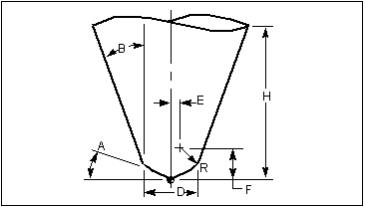
typedef struct s_OPAPI_CUTTER
{
  double cutterDiameter;/* Cutter diameter, D */
  double cutterHeight;/* Cutter height, H */
  double cornerRadius; /* Corner radius, R */
  double eDistance;/* Distance from tool centerline to corner radius center, E */
  double fDistance;/* Distance from tool tip to corner radius center, F */
  double baseAngle;/* Base angle, A */
  double sideAngle;/* Side angle, B */
} sOPAPI_CUTTER;
typedef struct s_OPAPI_MAP
{
  double toolEnd[2]; /* Tool tip at starting position projected to the projection grids, in gridAxisX, gridAxisY */
  double gridOrigin[3]; /* Origin of projection grids in X, Y, Z */
  double gridAxisX[3];/* Projection grids' X axis in I, J, K. X axis in normal to the Z axis and tool axis in starting position */
  double gridAxisY[3]; /* Projection grids' Y axis in I, J, K */
  double gridAxisZ[3]; /* Projection grids' Z axis in I, J, K. Z axis is the unit vector of cutter translation position vector */
  double gridSize; /* Length of each grid */
  int numGridsX;/* Number of grids along gridAxisX */
  int numGridsY;/* Number of grids along gridAxisY */
  int maskSize; /* Number of int/32 bits that are used to store the mask */
  int *gridMask; /* Pointer to grid mask */
} sOPAPI_MAP;
typedef struct s_OPAPI_PROFILE
{

  double pt[2]; /* x, y values for a point or an arc center

  double rad; /* arc radius with sign: negative radius means arc direction is clock wise, positive radius means arc direction is counter clock wise, 0 radius means it's a point not an arc.

}sOPAPI_PROFILE;
void opapi_free(char *data)
Free memory.
Parameters:
data: Input, memory pointer.
void opapi_get_contact_area(int *contact, double *area)
Get the area that tool is in contact with material
Parameters:
contact: Output, 1 if tool is in contact with material, 0 if not.
area: Output, area of material that is in contact with the tool.
void opapi_get_current_tool(char **tool_id, int *is_apt, OPAPI_APT_CUTTER *apt_cutter)
Get the current tool information. This function can be called in OPAPI_ToolSetupFunction, to retrieve information about the current loaded tool.
Parameters:
tool_id : Output, tool id of current tool as defined in tool library. Will be null if an apt tool is defined by cutter statement.
is_apt : Output, 1 if an apt cutter, 0 if not.
apt_cutter : Output, cutter definition stored in sOPAPI_CUTTER if current tool is an apt cutter.
void opapi_get_cut_machine_position(double start[12], double end[12])
Get machine positions at the starting and ending points of current motion.
Parameters:
start: Output, machine starting position in (X, Y, Z, U, V, W, A, B, C, A2, B2, C2)
end: Output, machine ending position in (X, Y, Z, U, V, W, A, B, C, A2, B2, C2)
void opapi_get_current_machine_position(double pos[12])
Get machine positions at current motion interval.
Parameters:
start: Output, machine starting position in (X, Y, Z, U, V, W, A, B, C, A2, B2, C2)
end: Output, machine ending position in (X, Y, Z, U, V, W, A, B, C, A2, B2, C2)
void opapi_get_current_tool_position_in_local_csys(double pos[6])
Get tool position at current interval of current cut in active coordinate system.
Parameters:
pos: Output, tool position in active coordinate system, defined by tool tip position [0-2] in (X, Y, Z) and tool axis vector [3-5] in (I, J, K).
void opapi_get_current_tool_position_in_active_csys(double pos[6])
Get tool position at current interval of current cut in Vericut’s active coordinate system.
Parameters:
pos : Output, tool position in active coordinate system, defined by tool tip position [0-2] in (X, Y, Z) and tool axis vector [3-5] in (I, J, K).
void opapi_get_current_machine_axes_location(double pos[3])
Get locations of machine axes(X, Y, Z) resulting from processing the current G-Code NC program record at current interval of motion.
Parameters:
pos : Output, machine axes value (X, Y, Z).
void opapi_get_current_local_axes_location(double pos[3])
Get locations of machine axes(X, Y, Z) in local coordinate system at current interval of motion.
Parameters:
pos : Output, machine axes value (X, Y, Z) in local coordinate system.
void opapi_get_current_tool_position_in_machine_csys(double pos[6])
Get tool position at current interval of current cut in machine origin coordinate system.
Parameters:
pos : Output, tool position in machine coordinate system, defined by tool tip position [0-2] in (X, Y, Z) and tool axis vector [3-5] in (I, J, K).
void opapi_get_cut_machine_position(double start[12], double end[12])
Get machine positions at the starting and ending points of current motion.
Parameters:
start : Output, machine starting position in (X, Y, Z, U, V, W, A, B, C, A2, B2, C2)
end : Output, machine ending position in (X, Y, Z, U, V, W, A, B, C, A2, B2, C2)
void opapi_get_current_machine_position(double pos[12])
Get machine positions at current motion interval.
Parameters:
start : Output, machine starting position in (X, Y, Z, U, V, W, A, B, C, A2, B2, C2)
end : Output, machine ending position in (X, Y, Z, U, V, W, A, B, C, A2, B2, C2)
void opapi_get_cut_tool_position(double start[6], double end[6])
Get tool positions at the starting and ending points of current motion. The start/end positions are relative to the "stock" component's coordinate system.
Parameters:
start : Output, tool starting position, defined by tool tip position [0-2] in (X, Y, Z) and tool axis vector [3-5] in (I, J, K).
end : Output, tool ending position, defined by tool tip position [0-2] in (X, Y, Z) and tool axis vector [3-5] in (I, J, K).
void opapi_get_cut_tool_position(double start[6], double end[6])
Get tool positions at the starting and ending points of current motion. The start/end positions are relative to the cut stock model’s coordinate system.
Parameters:
start: Output, tool starting position, defined by tool tip position [0-2] in (X, Y, Z) and tool axis vector [3-5] in (I, J, K).
end: Output, tool ending position, defined by tool tip position [0-2] in (X, Y, Z) and tool axis vector [3-5] in (I, J, K).
void opapi_get_decompressed_map_data(sOPAPI_MAP *map, int *size, char **values)
Transform immersion data to the form of an array of integers, decompressed by gridMask. Each array element has a value of 0 or 1. For example, values[numX] = 0 means on the [numX]th grid (row = 1, column = 0), the cutter has no contact with material.
Parameters:
map : Input, a map structure that contains grid mask data.
size : Output, size of the unsigned array.
values : Output, pointer to the bit array. Must be freed by using opapi_free(char *).
void opapi_get_grid_map(sOPAPI_MAP * map)
Get detailed tool-material immersion data.
Parameters:
map: Output, returned map->gridMask field must be freed by using opapi_free(char *).
Vericut provides kinematics of cutter immersion data in the form of a grid map, a mapping of what parts of the workpiece are in contact with the cuter and stores it in the sOPAPI_MAP structure. The grid map is a projection plane (gridAxisX & gridAxisY) that is normal to cutter transition vector (gridAxisZ). Each grid has a bit value of 1 or 0, with 1 meaning the projected part on the workpiece is in contact with the cutter and 0 meaning no contact. All the grid bits are stored row by row, starting from bottom to top, left to right, into (a) 32-bits integer(s).
void opapi_get_motion_type(eOPAPI_MOTION_TYPE *type, double circle[6])
Get current motion type.
Parameters:
type : Output, motion type defined in eOPAPI_MOTION_TYPE
circle : Output, circle defined by circle center [0-2] in (X, Y, Z) and circle normal [3-5] in (I, J, K) for circular motion.
void opapi_get_toolpath_record(int *rec_num, char **record)
Get the current toolpath record.
Parameters:
rec_num : Output, current record number(line number) in toolpath file.
record : Output, current toolpath record being processed.
void opapi_send_message(char *message, int display)
Send a message to Vericut.
Parameters:
message : Input, message to be sent
display : Input, 0 written to log file; 1 displayed in logger; 2 display in logger and written to log file.
void opapi_set_override_rpm(double rpm)
Set override spindle speed in rpm. This function should only be called in OPAPI_ToolSetupFunction, which sets up a new spindle speed for the tool just loaded.
Parameters:
rpm : Input, spindle speed in rpm.
void opapi_set_resolution(double distance)
Set optimization resolution distance. Optimization resolution distance controls the frequency or "sampling distance" used to analyze each tool path motion. Each feed rate controlled motion is partitioned into samples and OPAPI_OptimizeFunction is called based on this distance. Distance is measured along the tool motion. This function should only be called in the OPAPI_InitializeFunction.
If the user program does not set up a resolution by calling this function in initialization, a default resolution distance based on the size of the cutting tool relative to the displayed model is calculated by Vericut. This choice is recommended when little or no knowledge of cutting methods or feed rates is available.
Parameters:
distance : Input, optimization distance.
void opapi_write_out_comment_line(char *comments)
Write out a comment line in the optimized toolpath file. Only valid in G-code toolpath file.
Parameters:
comments : Input, comment line to write out. Must be a complete line, including starting comment character and end of line return character.