Subroutines, Subroutines panel
Location:
Info tab >  (Subroutines)
The Subroutines panel enables you to look at subroutines and related information in an easy to visualize manner.
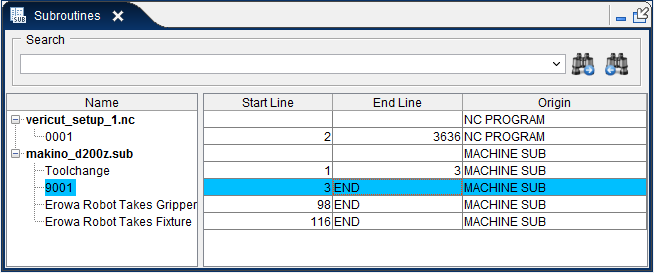
The Subroutines window includes a tree table. On the tree side, the files can be expanded and collapsed to see the subroutines in that file. The table includes the start line and end line of the subroutine and the origin. The origin can be an NC Program, Project Subroutine, Machine Subroutine, Control Subroutine, or Encrypted File.
Viewing Subroutines: When a subroutine is selected in the tree table, the starting line of the subroutine will automatically be shown in the NC Program window.
Search: The Subroutine Window has the ability to search forward or backward through the subroutines for the given keyword. The start of the found subroutine will then be highlighted in the NC Program window.
Back to NC Program: In order to go back to the current running NC Program, click the corresponding button on the NC Program panel.