Siemens Frames, Siemens Frames panel
Location:
Info tab >  (Siemens Frames)
Toolbar short cut: 
The Siemens Frames panel has features to assist you in debugging Siemens Frames.
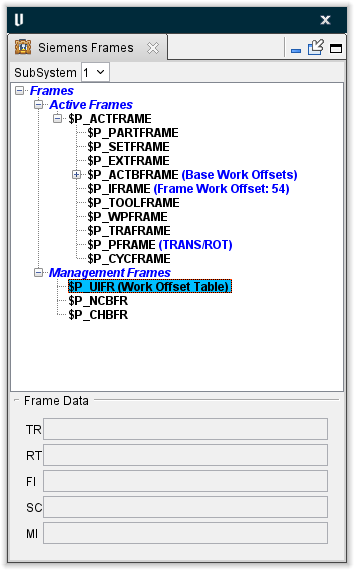
The Siemens Frames panel is one of the dockable panels enabling you to dock it inside the Vericut main window if you choose. See Personalizing the Vericut Main Window section of Vericut Help for additional information.
📝 NOTE: When the Siemens Frames panel is docked, make sure that you click in the panel so that it becomes the "active" panel before using F1 to get help specific to the panel. Otherwise F1 will go to the Vericut Help Library.
 (Close) — Located at the end of the tab, this icon enables you to close the panel.
 (Close) — Closes the panel. This icon is only displayed when the panel is not docked.
Frames are displayed in a tree format. $P_ACTFRAME is the sum of all Active Frames. Similarly, $P_ACTBFRAME is the sum of all $P_NCBFRAME’s and $P_CHBFRAME’s. For the Management Frames, $P_UIFR, $P_NCBFR, and $P_CHBFR are tables. All entries that are set will be displayed under their corresponding variable name.
Subsystem — all values displayed in the Siemens Frames panel are specific to a particular subsystem. If the machine configuration has more than one subsystem, use this feature to select the desired subsystem.
Active Frames — These are the Frames that are actively used when transforming the local Coordinate System. These frames are color coded as follows:
-
Black: Frame contains only initialized values (0 for offset and rotations, 1 for scaling, off for mirroring).
-
Red: Frame contains non-initialized values.
Management Frames — These Frames are like tables. $P_UIFR is the Work Offset Table, and is used to set the $P_IFRAME. $P_NCBFR and $P_CHBFR are tables that are used to set the $P_NCBFRAME and the $P_CHBFRAME.
Frame Data — displays the data associated with the selected Frame. Data is marked by two letter phrases as shown below:
-
TR – Translate/Offset values
-
RT – Rotation values
-
FI – Fine Offset values
-
SC – Scaling
-
MI – Mirroring