Check Syntax window
The Check Syntax window is accessed from the NC Program panel, or from the NC Program Review panel: NC Program listing area, by selecting Check Syntax, in the Utilities menu, or using  (NC Program Syntax Check) in the icon bar in either of the windows.
The features in this window enable you to check the NC program displayed in the NC Program (Info) window for syntax errors.
📝 NOTE: This feature is not applicable to APT NC programs.
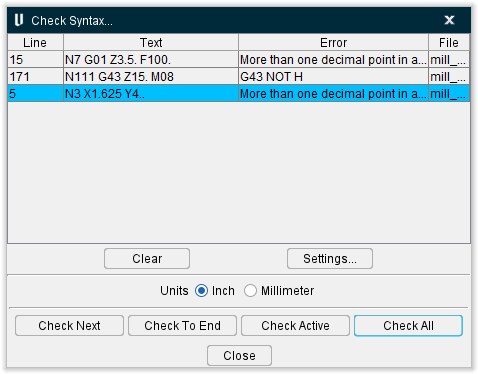
Check Syntax Error List
Line — This column contains the line in the NC Program listing that contains the syntax error. Click on the Line column header to sort The Syntax Error list by line number.
Text — This column contains the text of the block in the NC program listing that contains the syntax error.
Error — This column contains a description of the kind of syntax error found. Click on the Error column header to sort The Syntax Error list by error type.
File — This column contains the NC program or subroutine file name that syntax error is found in.
💡 Tip: Clicking on any syntax error in the Check Syntax error list moves the cursor to the corresponding block in the NC program displayed in the NC Program panel.
Clear — Clears all errors from the Check Syntax error list.
Settings — Displays the Word Format window: Syntax Check tab enabling you to view the current syntax checking settings and modify them if necessary. See Word Format window: Syntax Check tab section of Vericut Help for more information.
Units — Use to specify which word format string to check against in the Word Format table. The default is the unit value specified in the current control. Select either, Inch, or Millimeter.
Check Next — Starting at the current cursor location, Vericut searches the NC Program for the next syntax error and adds it to the Check Syntax error list.
Check To End — Starting at the current cursor location, Vericut searches to the end of NC Program and adds each syntax error that it finds to the Check Syntax error list.
Check Active — Vericut checks the NC program currently displayed in the NC Program panel and adds each syntax error that it finds to the Check Syntax error list.
Check All — Vericut checks all NC program and subroutine files referenced by the current setup and adds each syntax error that it finds to the Check Syntax error list.
Close — Closes the Check Syntax window.