G-Code Offsets Branch
Right-click on a G-Code Offsets branch in the Project Tree panel to display the following menu:
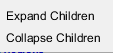
Expand All Children — Expands all branches below the G-Code Offsets branch.
Collapse All Children — Collapses all branches below the G-Code Offsets branch.
If the Configure icon is toggled “on”, the Configure G-Code Offsets menu displays at the bottom of the Project Tree.
G-Code Table
Right-click on a G-Code Table in the Project Tree panel to display the following menu:

Add — Adds an additional G-code Table to the Project Tree.
Delete — Deletes the highlighted G-code Table from the Project Tree.
If the Configure icon is toggled “on”, the Configure G-Code Offsets menu displays at the bottom of the Project Tree.
Work Offsets
Right-click on a Work Offsets in the Project Tree panel to display the following menu:
Add — Adds an additional Work Offset to the Project Tree.
Delete — Use to delete one, or more, highlighted Work Offsets from the Project Tree. Use the Shift key to select a range of Work Offset Records so that they become highlighted. Use the Ctrl key to select multiple individual Work Offset Records so that they become highlighted.
If the Configure icon is toggled "on", the Configure Work Offsets menu displays at the bottom of the Project Tree.