Calculator window
The Calculator window is accessed from the NC Program panel by selecting Calculator, in the Utilities menu.
The features in the Calculator window enable you to do mathematical calculations and conversions from inside Vericut. Simply enter the value in the text field, and then click on the desired function button.
You can also use the Calculator window to determine the current value of a variable. Enter #variable, where variable is the variable name, in the text field and Vericut will return the current value of "variable".
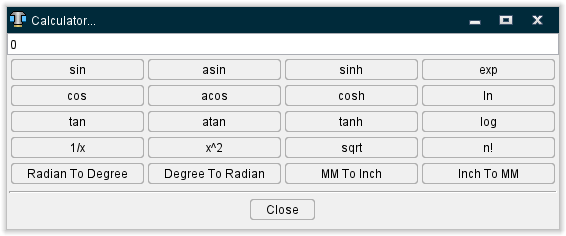
Functions
sin — Returns the sin of the angle specified. Enter the angle, in degrees, in the text field.
asin — Returns the arc sine of the value entered in the text field. The specified value must be in the range of -1.0 to 1.0. The returned value is in degrees, and is in the range of -90.0 to 90.0.
sinh — Returns the hyperbolic cosine of the given angle. Enter the angle, in degrees, in the text field.
exp — Returns the natural logarithm "e" raised to the specified power specified in the text field.
cos — Returns the cosine of the specified angle. Returns the hyperbolic tangent of the given angle specified in degrees.
acos — Returns the arc cosine of the value entered in the text field. The specified value must be in the range of -1.0 to 1.0. The return value is in degrees, and is in the range of 0.0 to 180.0.
cosh — Returns the hyperbolic cosine of the specified angle. Enter the angle, in degrees, in the text field.
ln — Returns the natural logarithm of the value entered in the text field.
tan — Returns the tangent of the specified angle. Enter the angle, in degrees, in the text field.
atan — Returns the arc tangent of the value entered in the text field. The specified value must be in the range of -1.0 to 1.0. The return value is in degrees, and is in the range of -90.0 to 90.0.
tanh — Returns the hyperbolic tangent of the specified angle. Enter the angle, in degrees, in the text field.
log — Returns the base 10 logarithm of the value entered in the text field. The specified value must be positive otherwise zero is returned.
1/x — The inverse key replaces the variable x with the value entered in the text field and returns the answer in the format of a decimal point fraction.
x^2 — Returns the square of the value entered in the text field.
sqrt — Returns the square root of the value entered in the text field.
n! — Returns the factorial value (n! = 1· 2· 3· · · (n − 2)(n − 1)n ) of the number entered in the text field.
Radian To Degree — Returns the "degree" equivalent of the "radian" angle value entered in the text field.
Degree To Radian — Returns the "radian" equivalent of the "degree" angle value entered in the text field.
MM To Inch — Returns the "inch" equivalent of the "millimeter" value entered in the text field.
Inch To MM — Returns the "millimeter" equivalent of the "inch" value entered in the text field.
Close — Closes the Calculator window.