Supported APT-CLS NC Program Records
APT NC program records typically contain a major vocabulary word followed by a slash ("/"), then a combination of data and/or minor vocabulary words. APT records can be preceded by leading spaces or tabs. Spaces can appear anywhere in the record. APT record data typically ends prior to column 72. However, a "$" at the end of a record continues onto the following line.
The APT NC program records processed by Vericut are listed below in alphabetical order. See the appropriate section for details. Records not listed are typically ignored by Vericut. They are recognized by Vericut but are always ignored and are not affected by the "Ignore" switch. No error or warning messages are output when they are encountered. The following list of APT major words falls into this category:
ARCSLP, ATANGL, AUTOPS, AUXFUN, CALL, CANON, CCW, CLAMP, COPY,
COUPLE, CHECK, CHUCK, CUT, CL, CLPRNT, CW, CYLINDER, CYLNDR, DELAY,
DELETE, DISPLAY, DNTCUT, DRAFT, DRESS, END-OF-PATH, FIXOFF, GO, HEADER,
IF, IFRO, INDEX, INSERT, INTOL, ISN, JUMPTO, LEADER, LETTER, LIBRY, LINTOL,
MACHIN, MCHTOL, MDEND, MDWRIT, MOVETO, OFSTNO, OPSKIP, ORIGIN,
OUTTOL, PAINT, PARTNO, PICKUP, PITCH, PLABEL, PLOT, POSMAP, POSTN,
PPFUN, PPLOT, PPTOL, PREFUN, PROBE, PROGRM, PSIS, RAPD0, RAPD1, READ,
REDEF, RESET, REMARK, REWIND, SAVEL, SCALE, SELCTL, SELECT, SETSIDE,
SEQNO, SLOWDN, SUB, SUBSTART, THICK, THREAD, TIME, TLCHG, TLONPS,
TMARK, TM, TOLER, TOLTBL, TOOLNO, TRACUT, VERIFY, ZOFF.
The following APT NC program records are processed by Vericut:
ARC record
The ARC record causes circular motion. The format of this record is similar to CIRCLE record, except specifies the arc end point via an additional set of X, Y, Z values.
CATIA0 record
The CATIA0 record specifies a CATIA-style twelve parameter tool path transformation matrix. Vericut processes this record when Process Matrix, on the APT Settings window: Motion tab, is active.
Example:
$$*CATIA0
$$*AXS2
$$ .00000 .00000 1.00000 -6.59040
$$ .99360 .11299 .00000 -16.50458
$$ -.11299 .99360 .00000 -3.32025
CHGTOOL record
The CHGTOOL record specifies the tool number to be changed into the spindle, same as LOADTL record. This record is not processed by default, however, you can use Tool Change By, in the NC Program panel, to process this record and retrieve cutting tool descriptions from a Vericut tool library.
Format:
CHGTOOL/n[,any text]
CIRCLE record
The CIRCLE record causes circular motion. The GOTO point preceding the CIRCLE record defines the start of the circular motion. The GOTO following the CIRCLE defines the circular motion end. Helical motion is generated when the end point measured along the tool axis differs from the start point. This record is processed when Process Circles, on the APT Settings window: Motion tab, is active.
Formats:
CIRCLE/x,y,z,i,j,k,r[,n,n,n,n] - where "x,y,z" defines the circle center point, "i,j,k" is the axis orientation. "r" is the circle radius, but is not used since the radius is computed from the start, end and center points. The vector defines the positive Z-axis of counter-clockwise motion following the right-hand rule. In the 11 parameter format, Vericut only uses the first 7 parameters.
Examples:
CIRCLE/1,2,3,0,0,1,5 - CCW circle motion about point 1,2,3, radius of 5
CIRCLE/1,2,3,0,0,-1,5 - as above, except CW arc motion
CLEARP record
The CLEARP record defines a clearance plane used by subsequent RETRCT records. See also: Default CLEARP on the APT Settings window: Motion tab.
Formats:
CLEARP/OFF
CLEARP/value
CLEARP/XYPLAN(YZPLAN or ZXPLAN),value - establish a clearance plane parallel to the part coordinate XY, YZ, or ZX plane, respectively at "value" distance from the part coordinate system origin. Only one plane may be active at one time. If no plane option is specified, XYPLAN is assumed.
CLEARP/PERPTO,value - establishes a clearance plane perpendicular to the tool axis at "value" distance from the part coordinate system origin. Clearance plane distance is measured in the direction of the tool axis. Changing the tool axis vector changes the clearance plane.
CLRPLN record
The CLRPLN record defines a clearance plane, the same as the CLEARP record.
CLRSRF record
The CLRSRF record defines a clearance plane, the same as the CLEARP record.
CNTRL record
The CNTRL record defines a control point for use with a NURBS record.
Formats:
CNTRL/x,y,z[,i,j,k][,WEIGHT,w] - where "x,y,x" are the control points (or poles) for tool position, optional "i,j,k" values control the tool axis, and optional "w" specifies the weights.
CONT record
The CONT record is a GOTO continuation record, similar to the GOTO record.
Formats:
CONT/x,y,z
x,y,z
:
CONT/x,y,z,i,j,k
x,y,z,i,j,k
:
COOLNT record
The COOLNT record controls coolant usage. Text following the slash is displayed in the Status window as the current coolant condition.
Formats:
COOLNT/any text
COOLNT/ON[,any text]
COOLNT/OFF
CSYS record
The CSYS record specifies a Pro/Manufacturing-style twelve parameter tool path transformation matrix. Vericut processes this record when conditions are suitable. A more detailed explanation follows. The "$\(->FEATNO" record resets back to the identity matrix, and "\)$->END" ends TRANS/ROTATE/CSYS actions.
Example:
$$-> CSYS / 1.0000000000, 0.0000000000, 0.0000000000, 0.0000000000, $
0.0000000000, 1.0000000000, 0.0000000000, 0.0000000000, $
0.0000000000, 0.0000000000, 1.0000000000, 0.0000000000
ProManufacturing APT has combinations of options that determine how ROTATE, TRANS, and CSYS are applied. For Vericut to determine how to apply these transformations, all records are processed concurrently. The table below describes cases where ROTATE, TRANS, and CSYS are processed. Vericut ignores these records for cases that are not described in the table.
| "ROTATE" record present | "TRANS" record present | "$$->TRANS" present | Action |
|---|---|---|---|
| No | No | No | Ignore CSYS and TRANS |
| No | No | Yes | Apply TRANS |
| No | Yes | No | Apply CSYS |
| Yes | No | Yes | Add TRANS to CSYS, then apply CSYS |
| Yes | Yes | No | Apply CSYS |
CUTCOM record
The CUTCOM record supports cutter compensation for Pro/Manufacturing CL data. If Vericut encounters:
$$-> CUTCOM_GEOMETRY_TYPE / OUTPUT_ON_PROFILE
Then sees a CUTCOM/LEFT, or CUTCOM/RIGHT, it reads ahead to the CUTCOM/OFF. The profile is then offset to the left or right by the cutter radius and Vericut re-reads the APT, making adjustments as required. The algorithm used is not intended to match any particular postprocessor or controller.
If Optimization is being used, the OUTPUT_ON_PROFILE gets replaced by OUTPUT_ON_CENTER in the generated file, and the subsequent GOTOs refer to the cutter centerline.
CUTTER record
The CUTTER record describes the shape of the cutting tool.
This record is processed by default, however, you can use Tool Change By, in the NC Program panel, to ignore these and process other records in the NC program file to retrieve cutting tool descriptions from a Vericut tool library.
Formats:
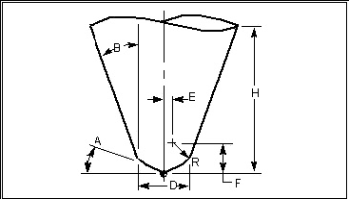
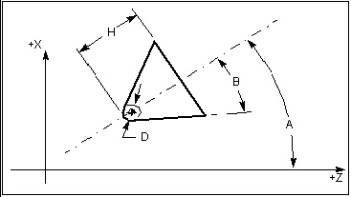
CUTTER/d,r,e,f,a,b,h
CUTTER/d,r,h
CUTTER/d,r (requires Min. Cutter Height > 0)
CUTTER/d (requires Min. Cutter Height > 0)
CUTTER/XCUT(SHANK or HOLDER),...profile description
The table below and figures that follow describe how the values "d" through "h" are interpreted, based on if the cutter is used for milling or turning.
| Value | Milling Cutter | Turning Cutter |
|---|---|---|
| d | diameter | nose diameter |
| r | corner radius | not used |
| e | dist. from tool centerline to corner radius center | not used |
| f | dist. from tool tip to corner radius center | not used |
| a | base angle | tool angle- degrees from spindle axis |
| b | side angle | side angle- degrees from tool centerline to its side |
| h | height | height- measured from tool tip along its centerline |
Generic 7 Parameter Mill Cutter Definition: CUTTER/d,r,e,f,a,b,h
Generic 4 Parameter Turn Cutter Definition: CUTTER/d,0,0,0,a,b,h (or CUTTER/d,,,,a,b,h)
CYCLE record
The CYCLE record describes a canned tool axis cycle motion (e.g. drilling, reaming, boring, etc.) that is to be repeated at subsequent motion locations. The Drill Cycle feature, in the Motion window, controls when and how these records are simulated.
Formats:
CYCLE/
If canned cycle motions are not displayed as expected ensure that Drill Cycle is not set to Ignore. If cycle simulation is still not correct, use Cycle Def on the APT Settings window: Cycles tab to configure how Vericut interprets canned cycle commands.
CYLNDR record
The CYLNDR record causes circular motion, same as CIRCLE record.
END record
Ends the tool path transformation matrix caused by a combination of CSYS, ROTATE and TRANS records. Vericut processes this record when conditions are suitable. See the "CSYS record" for details.
FEATNO record
Resets the tool path transformation matrix caused by a combination of CSYS, ROTATE and TRANS records back to the identity matrix. Vericut processes this record when conditions are suitable. See the "CSYS record" for details.
FEDRAT record
This record sets the feed rate, or speed at which the tool moves. Text following the slash is displayed in the Status window as the current feedrate condition.
By default, a zero feedrate is used until a FEDRAT record is processed. The active feed rate value is used until another FEDRAT record is encountered. A RAPID motion overrides the active FEDRAT for that motion only.
Formats:
FEDRAT/value[,IPM] also: IPR, MMPM, MMPR - where “value” represents feedrate in the current mode. The feedrate value and mode, if specified, are displayed in the Status window Feedrate field.
FROM record
This record establishes where the tool is starting from. There is typically one record of this type per NC program file and it usually precedes any other motion record in the file. If a FROM record is not encountered, then the first GOTO point location is assumed to be the "from" position.
Formats:
FROM/x,y,z[,i,j,k] - where "x,y,z" is the starting point and "i,j,k" represents the starting tool axis vector. If no ijk information is found, then a tool axis of 0,0,1 is assumed.
GODLTA record
The GODLTA designates incremental cutter movement relative to the current cutter location.
Formats:
GODLTA/x,y,z - specifies the incremental distance along each axis to move the tool from its current location. For example, if the tool is currently at 4, 5, 6 in xyz when GODLTA/1,2,3 is processed, the tool moves to x=5 (4+1), y=7 (5+2), and z=9 (6+3).
GODLTA/value - moves the cutter along the tool axis the specified amount.
If there is a transformation active, such as by a previous rotary motion command or a stock transformation, then the GODLTA values are transformed accordingly.
GOFWD record
The GOFWD record designates forward cutter movement relative to the current cutter location. Vericut considers this record only when processing motion generated by GOFWD used with CIRCLE or CYLNDR records. Numerous formats are recognized, many of which also consider the INDIRV record to determine the "forward" motion direction.
GOHOME record
The GOHOME record specifies that the cutter return to the home position. The home position is assumed to be the location specified by the last FROM record processed. If a FROM record has not been processed, then 0, 0, 0 is used.
Formats:
GOHOME - move all axes to the home position. The GOHOME Motion feature, on the APT Settings window: Motion tab, controls if the cutter is moved in a straight line, or is retracted prior to going home.
GOHOME/XAXIS(YAXIS or ZAXIS) - treated as GOTO statements with the specified AXIS element set to the FROM value for that axis. The other two elements are set to the current tool path position values.
GOTO record
Designates a position where the tool is moved to.
Formats:
GOTO/x,y,z[,i,j,k] - where "x,y,z" represent the ending location of the tool motion and optional "i,j,k" values control the tool axis in multi-axis movements. "0,0,1" tool axis orientation is assumed. "GOTO/" text is optional after the first GOTO motion,
for example:
GOTO/x,y,z[,i,j,k]
x,y,z[,i,j,k]
:
HEAD record
Found in NC programs for mill-turn and 4-axis lathe machines, the "HEAD" record specifies which machining head is in use.
Formats:
HEAD/1- head 1 active
HEAD/2- head 2 active
HEAD/BOTH- head 1 active
HEAD/OFF- head 1 active
When head 2 is active the tool is changed via a "LOADTL" or "TURRET" record, Vericut adds the characters "2_" to the beginning of the tool ID specified by the LOADTL/TURRET record to enable retrieving tools defined for use by head 2.
Example 1:
HEAD/1
TURRET/1
Looks for ID "1" in the Tool Library (interpreted as tool 1 for use by head 1).
Example 2:
HEAD/2
TURRET/1
Looks for ID "2_1" in the Tool Library (interpreted as tool 1 for use by head 2).
INDIRV record
Use the INDIRV record to specify vector coefficients describing the "forward" motion direction. Vericut considers this record only when processing motion generated by a GOFWD record used with CIRCLE or CYLNDR records.
Format:
INDIRV/i,j,k
KNOT record
The KNOT record defines a knot parameter for use with a NURBS record.
Format:
KNOT/t1,...,t(n-p+2) - where "t1" - "t(n-p+2)" are the knot parameters.
LOAD/TOOL record
The LOAD/TOOL record specifies the tool number to be changed into the spindle, same as LOADTL record. This record is not processed by default, however, you can use Tool Change By, in the NC Program panel, to process this record and retrieve cutting tool descriptions from a Vericut tool library.
Format:
LOAD/TOOL,n[,any text]
See also HEAD record for information about how the Pro/MFG APT "HEAD" record affects how this record is used to retrieve tool from a Vericut tool library.
LOAD/WIRE record
For wire EDM machining- causes the wire to be loaded-sets cutting mode in Vericut for wire EDM machining. See also UNLOAD/WIRE record.
LOADTL record
The LOADTL record specifies the tool number, or pocket number, of the tool to be loaded into the spindle. Optionally, this record may also specify tool length or other aspects about the tool; however, Vericut ignores all parameters following the tool number.
This record is not processed by default, however, you can use Tool Change By, in the NC Program panel, to process this record and retrieve cutting tool descriptions from a Vericut tool library.
Format:
LOADTL/n[,any text] - where "n" is the index number of the tool (number or alpha-numeric). Leading zeros in the tool ID are also ignored, for example "LOADTL/01" is interpreted as "LOADTL/1". Any text following the "/" or number data after tool ID is ignored, for example "LOADTL/2,LENGTH,6.500" is interpreted as "LOADTL/2".
See also HEAD record for information about how the Pro/MFG APT "HEAD" record affects how this record is used to retrieve tools from a Vericut tool library.
MODE record
Identifies the machining to be performed: mill or turn.
Formats:
MODE/MILL(TURN)
MOVARC record
The MOVARC record causes circular motion, the same as the CIRCLE record.
MSYS record
The MSYS record specifies an NX-style nine parameter tool path transformation matrix. Vericut processes this record when Process Matrix, on the APT Settings window: Motion tab, is active.
MULTAX record
The MULTAX record specifies that subsequent GOTO motions are multi-axis motions. The multi-axis condition is modal. When multi-axis mode is on it remains on until another MULTAX record turns it off.
Formats:
MULTAX/ON
MULTAX/OFF
NURBS record
The NURBS record defines a NURBS B-spline motion command. NURBS motion commands also utilize the CNTRL record and KNOT record as part of the B-spline definition.
Format:
NURBS/[p]- where "p" indicates the B-spline order. The "NURBS" record typically spans multiple lines and includes a number of other record types, such as "KNOT", "CNTRL", etc.
Example:
NURBS/
KNOT/1.0000000
CNTRL/61.2424,93.2577,-31.6260
:
CNTRL/59.8775,93.2224,-31.6263
PPRINT record (general purpose)
Comment record that typically has no effect on tool motion. "PPRINT" resides in columns 1-6. Text following "PPRINT" is typically ignored by Vericut; however, some PPRINT records can perform Vericut actions.
PPRINT/ATP CBOX record
The PPRINT/ATP record defines a stock block via min/max corner points. This record is processed by Vericut when a stock model is loaded and the model is not yet cut. A new stock block is defined and fit into all displayed views.
Format:
PPRINT/ATP CBOX xmin,ymin,zmin,xmax,ymax,zmax
Example:
PPRINT/ATP CBOX -1,-2,-1,5,7,2 -defines a 6 x 9 x 3 block positioned X= -1, Y= -2, Z= -1
PPRINT TOOL AXIS record
The PPRINT TOOL AXIS record specifies that a new tool axis orientation is to be applied to subsequent tool positions. The specified tool axis is modal and remains in effect until another tool axis orientation is specified.
Example:
PPRINT TOOL AXIS= XAX=-1.0000 YAX=.0000 ZAX=.0000
PPRINT/Vericut record
(or PPRINTVERICUT) Sets a Vericut user value, or performs a Vericut command or action. PPRINT/Vericut text must be between columns 1-72. PPRINT data can span multiple PPRINT records via ending each PPRINT to be continued in a dollar sign. The next line must be a PPRINT/Vericut record with the same keyword as the previous line. Words in PPRINT data cannot be split by the dollar sign. Examples are provided in the sections that follow.
RAPID record
The RAPID record overrides the current feed rate and causes a machine tool to move as fast as possible. When the RAPID record is processed by Vericut, the motion following the RAPID record moves the tool using the Fast Feed setting in the Motion window.
For example, assume the file below is processed while Fast Feed=100.
RAPID
GOTO/1,2,3
FEDRAT/20
GOTO/2,3,4
RAPID
GOTO/3,4,5
GOTO/4,5,6
The motions are simulated by Vericut as follows:
feedrate from the current tool location to 1,2,3: 100
feedrate from 1,2,3 to 2,3,4: 20
feedrate from 2,3,4 to 3,4,5: 100
feedrate from 3,4,5 to 4,5,6: 20
In both examples below, motion from 1, 2, 3 to 4, 5, 6 uses a feed rate of "20":
Example 1:
FROM/1,2,3
RAPID
FEDRAT/20
GOTO/4,5,6
In example 1, a FEDRAT record immediately follows the RAPID record before a motion is encountered. Under this condition, the FEDRAT value overrides a RAPID record.
Example 2:
RAPID
FROM/1,2,3
FEDRAT/20
GOTO/4,5,6
In example 2, a FROM record is not considered to be a motion record. Therefore, the RAPID record has no affect.
RETRCT record
The RETRACT record retracts the cutter along the tool axis to a specified clearance plane, or by a specified amount.
Formats:
RETRCT- retract the tool along the tool axis until it reaches the clearance plane defined by the previous CLEARP or CLRSRF record
RETRCT/value- retract along the tool axis the specified amount
RETRCT/ON- retract to the Z level prior to a cycle record.
Example:
GOTO/1,2,3
RETRCT/ON
CYCLE/DRILL,1.0,3,IPM,.1 $$ Retracts to Z=3 between cycle positions.
ROTABL record
The ROTABL record specifies a table rotation. Unless otherwise specified, rotation about the Y-axis is assumed. This record is processed when the ROTABL setting, on the APT Settings window: Rotary tab is active. Otherwise, ROTABL is ignored.
Formats:
ROTABL/AAXIS(BAXIS or CAXIS),value
ROTABL/AAXIS(BAXIS or CAXIS),ATANGL,value
ROTABL/AAXIS(BAXIS or CAXIS),INCR,value
ROTABL/ATANGL,value
ROTABL/INCR,value
ROTATE record
Similar to the ROTABL record, this record specifies a table rotation. ROTATE is handled differently, depending on the active setting of NC Program Type, in the NC Program panel.
- Non-ProManufacturing NC program types - when the ROTATE setting, on the APT Settings window: Rotary tab, is active the rotary action is simulated by Vericut. Otherwise, ROTATE is ignored.
- Pro/MFG APT NC program types- ROTATE is considered along with TRAN and CSYS when determining if the tool path is to be transformed. See "CSYS record" for details. The "$\(->FEATNO" record resets back to the identity matrix, and "\)$->END" ends TRANS/ROTATE/CSYS actions.
Formats:
ROTATE/AAXIS(BAXIS or CAXIS),value
ROTATE/AAXIS(BAXIS or CAXIS),ATANGL,value
ROTATE/AAXIS(BAXIS or CAXIS),INCR,value
ROTATE/ATANGL,value
ROTATE/INCR,value
ROTHED record
The ROTHED record specifies a head rotation. This record is processed when the ROTHED setting, on the APT Settings window: Rotary tab, is active. Otherwise, ROTHED is ignored.
Formats:
ROTHED/ATANGL,value
ROTHED/value
SET/MODE record
This record specifies the machining to be performed: mill or turn.
Formats:
SET/MODE,MILL
SET/MODE,TURN
SPINDL record
The SPINDL record specifies spindle rotation speed (RPM); direction and gear ranges may also be specified. Text following the slash is displayed in the Status window as the current spindle condition.
Formats:
SPINDL
SPINDL/rpm[,any text]
SPINDL/[any text,]rpm
SPNDL record
Specifies spindle rotation speed (RPM), same as SPINDL record.
STOP record
The STOP record stops the NC machine at its current location. This record commonly indicates an operator function follows, such as: changing the tool, changing the part-fixture setup, etc.
SURFACE record
The SURFACE record causes circular motion, the same as the CIRCLE record.
TLAXIS record
The TLAXIS record specifies a new tool axis orientation. The new orientation is modal and is applied to following GOTO points that do not have I, J, K values. Vericut processes this record when NC Program Type, in the NC Program panel, is set to CATIA APT.
Example:
TLAXIS/ .000000, 1.000000, .000000
TRANS record
The TRANS record specifies a three parameter tool path translation. Vericut processes this record when NC Program Type, in the NC Program panel, is set to Pro/MFG APT and conditions are suitable. The presence of ROTATE and TRANS records affect when Vericut processes a TRANS record. See the "CSYS record" for details.
Format:
TRANS / dx, dy, dz
where "dx, dy, dz" are the distances in X, Y, and Z to translate the tool positions that follow. The "$\(->FEATNO" record resets back to the identity matrix, and "\)$->END" ends TRANS/ROTATE/CSYS actions.
TURRET record
Similar to the LOADTL record, this record often appears in NC programs for turning operations to specify the tool number to be changed into location for cutting. This record is not processed by default, however, you can use Tool Change By, in the NC Program panel, to process this record and retrieve cutting tool descriptions from a Vericut tool library.
The number following "TURRET" is often a composite of two numbers: a tool number and offset number. However, Vericut simply interprets the entire number as a tool number. For example, while "TURRET/0101" may indicate tool 01 is used with offset 01), Vericut interprets this to mean tool 0101 (or 101) is to be used from the Vericut tool library.
Formats:
TURRET/n[,any text]
TURRET/FACE,n[,any text]
See also HEAD record for information about how the Pro/MFG APT "HEAD" record affects how this record is used to retrieve tools from a Vericut tool library.
UNITS record
Sets the unit measurement system of the data in the NC program file: inches or millimeters.
Formats:
UNITS/INCHES
UNITS/MM
UNLOAD/WIRE record
For wire EDM machining- causes the wire to be unloaded-sets non-cutting mode in Vericut for wire EDM machining. See also LOAD/WIRE record.
VECTOR record
Designates a position where the tool is moved to, same as GOTO record.