Tool Use
Location:
File tab > Tool Use
This button opens the Tool Use graph which shows the machining time, in minutes, spent by each simulated tool. The text displayed to the left of the graph line(s) is the sub-system ID. Each tool that cuts the part is shown in the graph with its cut color. Tool changes are indicated by a spike in the graph line. Positioning the mouse cursor on or above a graph line displays data about that tool.
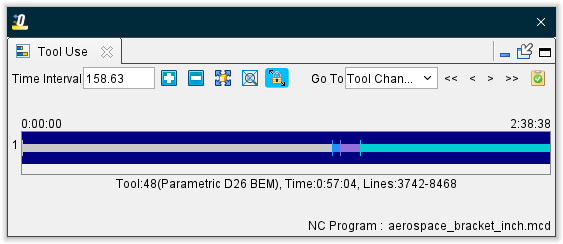
Zoom In/Out — Use the plus and minus buttons to zoom in or out respectively to better facilitate tool use viewing.
Fit — Use this button fit all of the results into the window.
Zoom in Box — Select this option to zoom in to a specific highlighted region that is designated by clicking within the display field. This function can also be accessed by holding down the right mouse button and then dragging a bounding box around the desired area.
Auto Zoom to Fit — Toggle this feature on (highlighted) automatically fit the tool use data in the viewing area. This feature is automatically toggled off (not highlighted) whenever the other zoom or fit features are used.
Go To — Use this dropdown menu and buttons to navigate to specific events in the Tool Use viewing area. Dropdown options include: Tool Change, Error, Warning, and NC Program. Button options include: Go To First, Go To Previous, Go To Next, and Go To Last.
NC Program Review — Use to active NC Program Review features.
There is also a Time display that shows how far into the simulation you are when the tool use occurs.
Tool Use graph features:
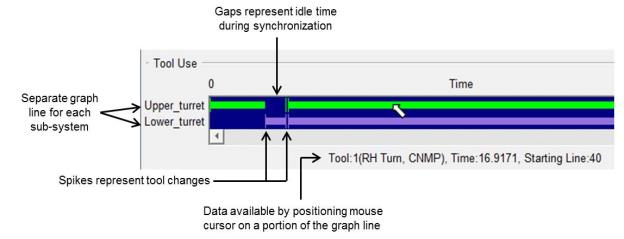
Sample Tool Use graphs:
Tool Use graph from a milling NC Program:

Tool Use graph from 4-axis merged turning NC Program:

Tool Use Right Mouse Button Menu
Right-clicking in the Tool Use viewing area produces the following menu:
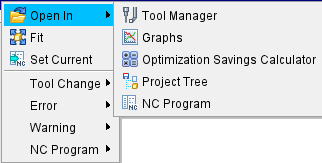
Open in — Generates a menu of options to view the selected tool. Options where to open include Tool Manager, Tool Use, Optimization Savings Calculator, Project Tree, and NC Program.
Fit — Use this option fit all of the results into the window.
Set Current — Marks the currently highlighted portion of the Tool Use viewing area as the set option.
Tool Change — Use this menu to navigate between Tool Change sections. The expanded menu contains Go To First, Go To Previous, Go To Next, and Go To Last options.
Error — Use this menu to navigate between Errors in Tool Use. The expanded menu contains Go To First, Go To Previous, Go To Next, and Go To Last options.
Warning — Use this menu to navigate between Warnings in Tool Use. The expanded menu contains Go To First, Go To Previous, Go To Next, and Go To Last options.
NC Program — Use this menu to navigate between NC Program changes in Tool Use. The expanded menu contains Go To First, Go To Previous, Go To Next, and Go To Last options.