CoroPlus window
Location:
Tool Manager > Import tab > CoroPlus Tool
The CoroPlus Tool button opens the Import CoroPlus Tools window enabling you to access tool assembly models and application data from CoroPlus ToolLibrary software.
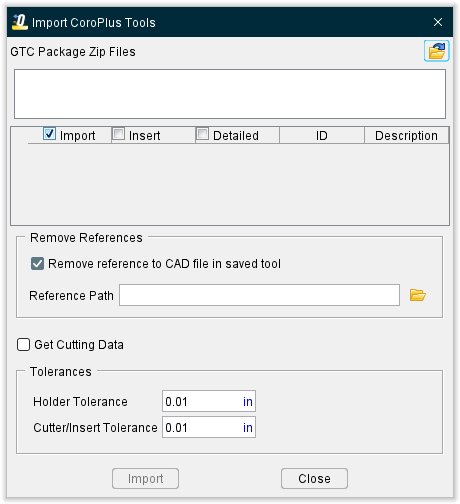
The CoroPlus Tool Import Interface window enables you to easily download Sandvik’s 3D tool models from the CoroPlus ToolLibrary and quickly transfer them to a tool library via a GTC package zip file. In the Tool Manager Import ribbon, click on the CoroPlus Tool command button from the Partners group to display the Import CoroPlus Tools window shown below. Cutting data can also be read in for certain Sandvik tooling during the import process for use in toolpath optimization within Tool Manager to run additional checks on your simulation.
GTC Package Zip Files — Enter the \path\filename of the .zip file containing the list of the tool models that you want to import in the text field, or click on the  (Browse) and use the Select CoroPlus Files file selection window that displays to specify the \path\filename of the .zip file containing the list of the tool models. Multiple zip files can be selected at once to import multiple tools.
Tool Table — After specifying the CoroPlus tool file, the Tool Table will be populated with a list of the tool models contained in the CoroPlus tool file.
Import — Toggle on (checked by default) to ensure that the selected tool is imported when Import is clicked.
Insert Cutters — Toggle on (checked) to import a tool so the cutter is defined as an insert (cutter) component.
Detailed 3D Models — Toggle on (checked) to import the detailed 3d model (if available) from the GTC.zip file. (Note: some tools in the GTC.zip file may or may not contain detailed models)
ID — Populates using the Name field from CoroPlus ToolLibrary. This Name will be used as the Tool ID in Tool Manager.
Description — Populates with the Description field from CoroPlus ToolLibrary. This Description will be used as the Description in Tool Manager. If a Description is not added in CoroPlus ToolLibrary the Name (ID) will be used as the Description
Remove reference to CAD file in the saved tool — When toggled "off" (not checked), the imported tool models are stored in the same CAD format that they were imported in. When toggled "on" (checked), the imported tool components are saved as Optimizer Polygon files.
📝 NOTE: The Model Tolerance value specified in Settings window: Properties tab (Project tab > Settings > Properties tab > Tolerance section) is used when creating the Optimizer Polygon (.ply) files.
Reference Path — Option to control where the .ply files from imported tools are stored.
-
If there is no .tls file saved/present prior to when tools are first imported, the .ply files by default go to the working directory.
- If a .tls file is saved/present prior to when tools are imported, the .ply files default to the location of the .tls file (may not be the current working directory).
-
By default, the Reference Path field will not display a path until
(Browse) is opened and a path is selected. - If "Remove reference to CAD file in saved tool" is UNCHECKED, "Reference path" option is greyed out and not available (will reference where .stp files currently reside).
Get Cutting Data — when toggled on (checked), the Get Cutting Data option enables you to add Stock Material Records to the tool assemblies being imported that contain cutting limits and optimization settings for use in the optimization of the NC Program. This option remains modal until changed by the user.
Holder Tolerance — Enables you to specify the Holder Tolerance by entering the tolerance value in the Holder Tolerance text field.
Cutter/Insert Tolerance — Enables you to specify the Cutter/Insert Tolerance by entering the tolerance value in the Cutter/Tolerance text field.
📝 NOTE: When specifying Holder Tolerance and Cutter/Insert Tolerance values, the specified values will be applied to Holder Tolerance and Cutter/Insert Tolerance in the Tool Manager Preferences window, the Import CAD Tool window and the Import CoroPlus Tools window.
Import — Use to import the designated tool models from the CoroPlus Tool zip file to the currently active tool library and then close the CoroPlus Tool Import Interface window.
Close — Close the CoroPlus Tool Import Interface window without importing the specified tool models.
GTC Package .zip File Information
GTC (Generic Tool Catalog) is a format to complement the ISO 13399 standard that Sandvik’s CoroPlus platform utilizes for exchanging data between cutting tool vendors and applications. The term GTC node refers to each cutting-tool component that is described according to ISO 13399. The CoroPlus Interface to Optimizer supports the following GTC node cutter types:
| GTC Node | Description | CGTech Tool Type | CGTech Cutter Type |
|---|---|---|---|
| BORISBI | Boring tool, back counterbore, indexable | Milling | Insert Cutter |
| DRLCONSS | Drill, Conical hole drill, solid, -symmetrical point | Holemaking | Rev. Profile |
| DRLCTRSA | Drill, Center drill, solid, Form A DIN/ISO | Holemaking | Rev. Profile |
| DRLCTRSB | Drill, Center drill, solid, Form B DIN/ISO | Holemaking | Rev. Profile |
| DRLCTRSNS | Drill, Center drill, solid, Non standard form | Holemaking | Rev. Profile |
| DRLCTRSR | Drill, Center drill, solid, Form R DIN/ISO | Holemaking | Rev. Profile |
| DRLFIA | Drill, Cylindrical hole drill, indexable, -asymmetrical point | Holemaking | Rev. Profile |
| DRLFIS | Drill, Cylindrical hole drill, indexable, -symmetrical point | Holemaking | Rev. Profile |
| DRLFSGP | Drill, Cylindrical hole drill, solid, -guide pad | Holemaking | Rev. Profile |
| DRLFSS | Drill, Cylindrical hole drill, solid, -symmetrical point | Holemaking | Rev. Profile |
| DRLSPTS | Drill, Spot drill, solid | Holemaking | Rev. Profile |
| MILBNRI | Ball nose milling cutter, Ball nose with radius side, indexable | Milling | Rev. Profile |
| MILBNRS | Ball nose milling cutter, Ball nose with radius side, solid | Milling | Rev. Profile |
| MILBNSI | Ball nose milling cutter, Ball nose with straight side, indexable | Milling | Rev. Profile |
| MILBNSS | Ball nose milling cutter, Ball nose with straight side, solid | Milling | Rev. Profile |
| MILCFBI | Chamfer milling cutter, Chamfer mill - front and back cutting, indexable | Milling | Rev. Profile |
| MILCFBS | Chamfer milling cutter, Chamfer mill - front and back cutting, solid | Milling | Rev. Profile |
| MILCFI | Chamfer milling cutter, Chamfer mill - front cutting, indexable | Milling | Rev. Profile |
| MILCFS | Chamfer milling cutter, Chamfer mill - front cutting, solid | Milling | Rev. Profile |
| MILFI | Milling cutter, Face milling cutter, indexable | Milling | Rev. Profile |
| MILFS | Milling cutter, Face milling cutter, solid | Milling | Rev. Profile |
| MILGS | Groove milling cutter, solid | Milling | Rev. Profile |
| MILPRAPS | Profiled milling cutter, Angle profile mill, solid | Milling | Rev. Profile |
| MILPRHCS | Profiled milling cutter, Quarter circle profile mill, solid | Milling | Rev. Profile |
| MILPRQCS | Profiled milling cutter, Quarter circle profile mill, solid | Milling | Rev. Profile |
| MILSFDHI | Milling cutter, Side and face mill, Double half side and face mill, indexable | Milling | Rev. Profile |
| MILSFFI | Milling cutter, Side and face mill, Full slot side and face mill, indexable | Milling | Rev. Profile |
| MILSFFS | Milling cutter, Side and face mill, Full slot side and face mill, solid | Milling | Rev. Profile |
| MILSFHI | Milling cutter, Side and face mill, Half side and face mill, indexable | Milling | Rev. Profile |
| MILSQI | Milling cutter, Shoulder face mill, indexable | Milling | Rev. Profile |
| MILSQS | Milling cutter, Shoulder face mill, solid | Milling | Rev. Profile |
| MILTHACS | Thread milling cutter, Thread mill - axial chamfering, solid | Milling | Rev. Profile |
| MILTHDCS | Thread milling cutter, Thread mill - drill and chamfer, solid | Milling | Rev. Profile |
| MILTHGS | Thread milling cutter, Thread mill, solid | Milling | Rev. Profile |
| MILTHMCS | Thread milling cutter, Thread mill - helical mill and chamfer, solid | Milling | Rev. Profile |
| MILTHOCS | Thread milling cutter, Thread mill - orbital chamfering, solid | Milling | Rev. Profile |
| MILTSI | T-slot milling cutter, indexable | Milling | Rev. Profile |
| MILTSS | T-slot milling cutter, solid | Milling | Rev. Profile |
| REASCYLS | Reamer, cylindrical hole, solid | Holemaking | Rev. Profile |
| TAPCCONF | Tap, Cutting tap for conical threads, chip flutes | Holemaking | Tap |
| TAPCCYLD | Tap, Cutting tap for cylindrical threads, drilling function | Holemaking | Tap |
| TAPCCYLF | Tap, Cutting tap for cylindrical threads, chip flutes | Holemaking | Tap |
| TAPCCYLG | Tap, Cutting tap for cylindrical threads, gun nose | Holemaking | Tap |
| TAPFCYL | Tap, Forming tap for cylindrical threads | Holemaking | Tap |
| TRNGEI | Turning tool, Tool holder, general turning, external turning tool, indexable | Turning | Insert Cutter |
| TRNGIBI | Turning tool, Internal turning tool, boring, indexable | Turning | Insert Cutter |
| TRNPAI | Turning tool, grooving, indexable | Turning | Insert Cutter |
| TRNPEI | Turning tool, Tool holder, general turning, external OD grooving, indexable | Turning | Insert Cutter |
| TRNGIBBI | Turning tool | Turning | Insert Cutter |
| TRNGIBS | Turning tool | Turning | Insert Cutter |
| TRNPII | Turning tool, grooving | Turning | Insert Cutter |
| TRNPIS | Turning tool, grooving | Turning | Insert Cutter |