DXF Geometry window
The DXF Geometry window enables you to import two dimensional geometry from files which comply with a de facto CAD system standard, the Data eXchange Format (DXF).
The DXF Geometry window is accessed in two areas of the Optimizer software:
-
Project menu > Setup > Models > right click menu > Add Model > Create Revolve/Create Sweep > Import DXF
OR -
Configure Models menu > Add Model > Create Revolve/Create Sweep > (Right Mouse Button in the Preview window) > Import DXF
This function is used to create profiles that can be rotated about an axis, or swept along an axis to create solid models for use in Optimizer.
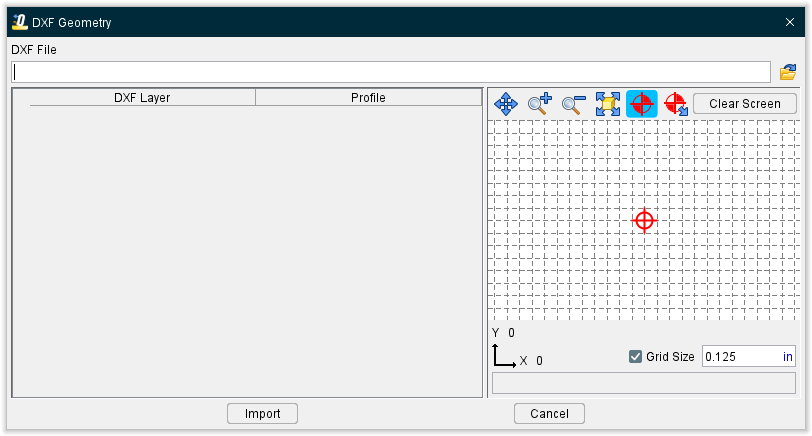
Importing DXF Profile Data:
DXF File — Use to specify the DXF file containing the tool data. Enter the /path/filename in the DXF File text field or click on the  (Browse) icon and use the Select DXF File window to specify the/ path/filename of the file.
Preview Grid icons
| Icon | Name | Action |
|---|---|---|
 |
Pan | Pan/translate- drag mouse in the direction pan |
 |
Zoom In | Zooms in approximately 20% each time it is clicked |
 |
Zoom Out | Zooms out approximately 20% each time it is clicked |
 |
Fit | Fits the tool in the sketcher window |
 |
Origin | When selected, displays the tool origin point |
 |
Origin Translate | Allows for the dynamic movement of the tool origin point |
 |
Clear Screen | When selected, unchecks all layer selections and clears the Preview Grid but retains the selected DXF file |
Component Table —
After specifying the DXF file, a record is created in the Component Table for each layer contained in the file. You can re-order the records in the table by clicking on the button in the first column of the record and dragging it to the desired position.
DXF Layer — This column displays the name, or number, identifier of the layer.
Profile — (Create Model File only) This column is used to identify the profile that is to be used.
Import — Imports the geometry data into the appropriate Profile Sketcher window, or in the case of Add > DXF Tool in the Tool Manager, into the appropriate tool record/tool component.
Cancel — Use to close the DXF Tool Geometry window.
DXF File Requirements:
Only the ENTITIES section of a DXF file is scanned by Optimizer. The BLOCKS section is ignored, so BLOCK references within the ENTITIES section will not be expanded. REPEAT entities are also ignored. The only geometric entity types processed are LINE, ARC, CIRCLE, POLYLINE, LWPOLYLINE, TRACE, SOLID, 3DLINE and 3DFACE.